
The functionality of the software PPO in the SERVIO program has already been implemented. What is it? How does it work? And why is it needed, read in the continuation of the article.
Software RPO – what is it?
To all entrepreneurs (except SPD of the first group) who have not yet adopted fiscal registrars, now is the time to switch to a virtual cash register or software PPO. For those already using traditional PPOs, transitioning to a software PPO for hotel or software PPO for restaurant can streamline operations. This is especially critical for businesses with fiscal registrars nearing their end of life. Embrace a modern software program for FOP to ensure compliance and efficiency.
Order calculationWho needs a software RPO?
To all entrepreneurs (except SPD of the first group) who still do not use fiscal registrars. Those who already use traditional PPOs can switch to software PPOs. This is especially important for those whose fiscal registrar is nearing its end of life.
Advantages of software RPO compared to classic RPO
Traditional PPO is:
- Significant initial costs for purchasing a fiscal registrar, especially for entrepreneurs with low turnover;
- Regular maintenance costs;
- The fiscal recorder has a service life of 7 years from the date of commissioning. After this period, it is necessary to purchase a new device.
In short, precisely so that the transition to mandatory processing of all payments through the cash register would be less painful for individual entrepreneurs, the legislation proposed an alternative to traditional financial statements - software-based PPO.
And now about the "pitfalls"
The operation of the software PPO requires a constant online connection to the fiscal server. In case of a lack of connection, the entrepreneur can continue to work offline for 36 hours, having previously notified the State Tax Service. In fact, this time is more than enough to restore the connection.
The second "difficulty" is the lack of a paper document confirming the fact of purchase. There is a discussion on the Internet about how to return goods without a fiscal receipt. The problem is solved by generating a QR or barcode, by which you can identify the purchase. Read more about this below.
How does software PPO work in SERVIO?
For users, working with a virtual cash register like the software PPO in SERVIO is seamless and closely resembles traditional PPO operations. This software program for FOP is integrated directly into the system. When processing payments, the software PPO automatically sends fiscal checks to the tax office, eliminating the need for additional staff actions.
Moreover, all electronic checks are securely stored in a database, ensuring no loss of data even during network outages.
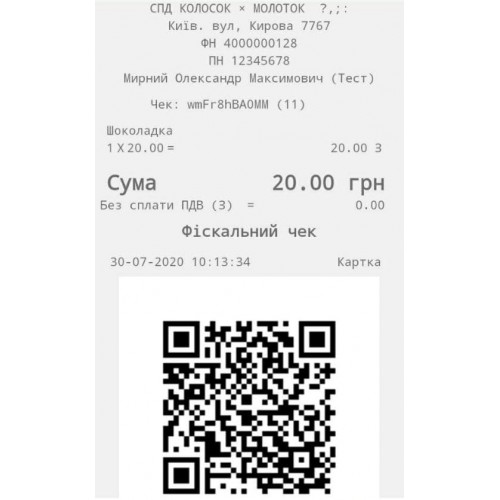
For clients, using the software PPO differs slightly from conventional payment methods. Instead of traditional paper fiscal checks, clients receive QR codes or barcodes that link to the corresponding document in the "Electronic Cabinet of the Tax Service".
SERVIO has several options for issuing QR code data:
- Using printers to print receipts (not fiscal). A QR code will be displayed on the receipt. Especially relevant for businesses with a large flow of guests without prior registration (cafes, coffee shops, water parks, cinemas).
- Sending "checks" by email. This method is suitable for businesses where customers first register by providing their email address (hotels, beauty salons, fitness centers).
We are also considering a third option – sending “electronic checks” via SMS or Viber messages. However, this method is still under development.
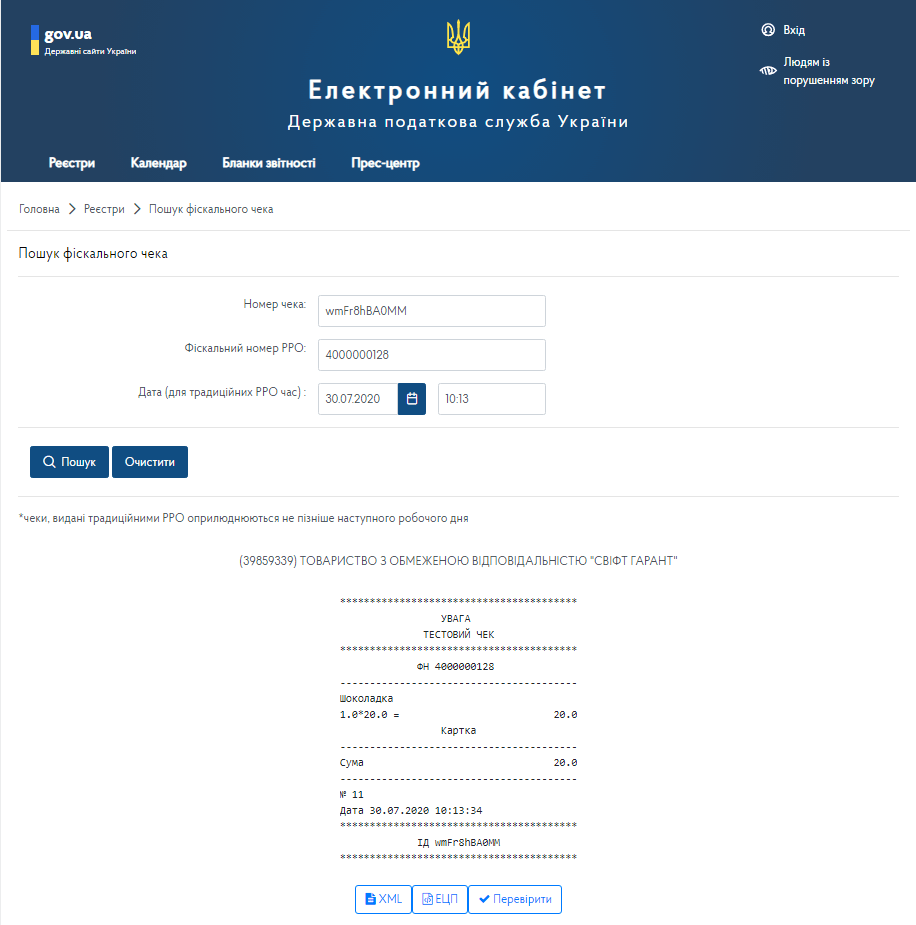
Step-by-step instructions on how to implement software-based RPO in your enterprise
We went all the way from conducting a transaction to its registration to clearly show how it works and what steps need to be taken for an enterprise to switch to software-based RPO.
The main action takes place in electronic account of the tax service
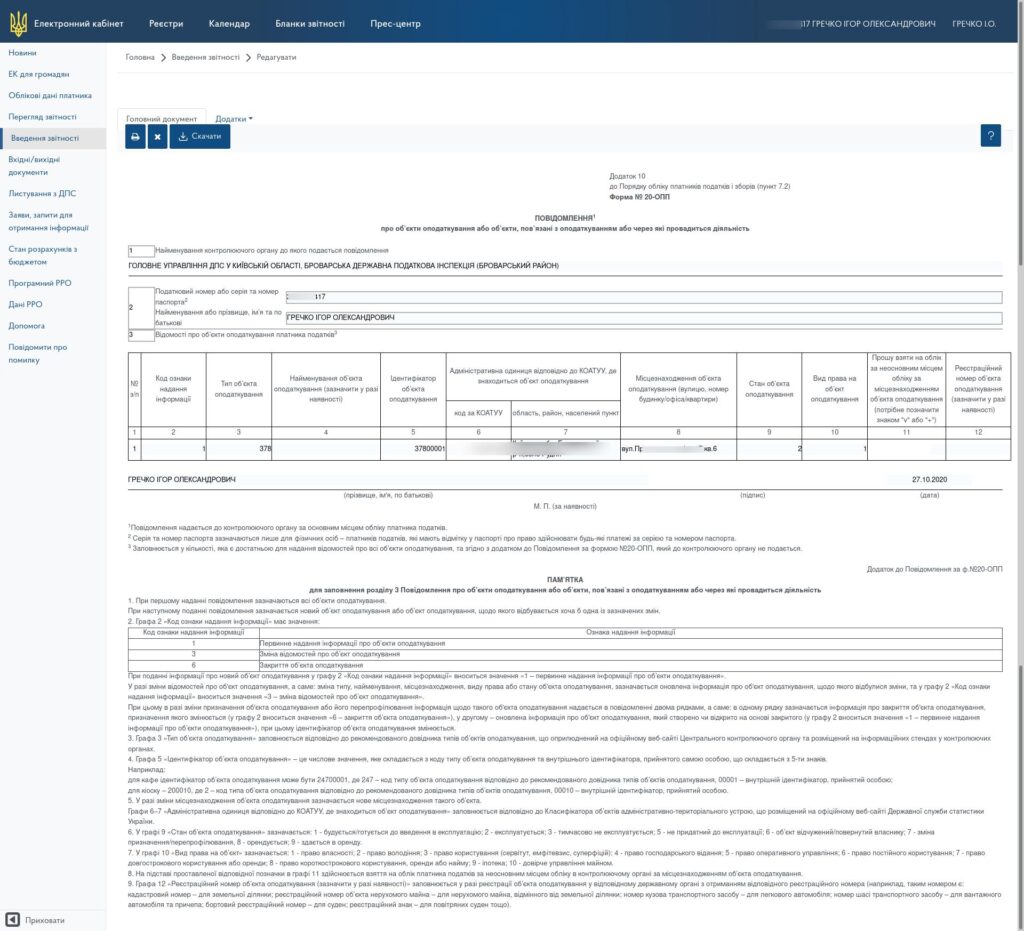
STEP 1. We create (check) the taxation object to which the software PPO will be connected.
From this section, you must take data on the tax object identifier and the address of the object when requesting registration of the tax return in the next step.
STEP 2. We apply for registration of a software RPO.
To do this, in the “Reporting” section, click the create a new query button.
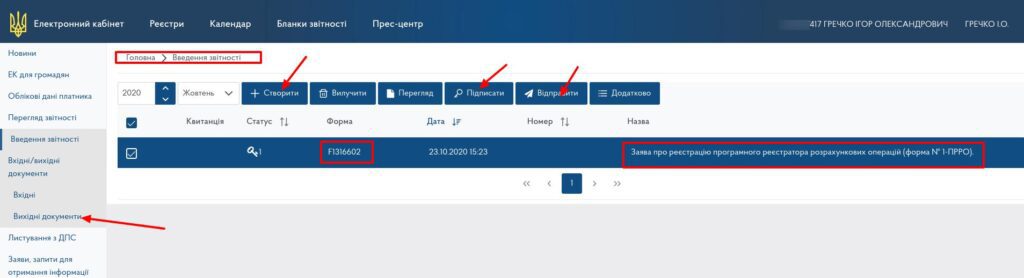
Select application template No. 1-prro (form J / F 1316602) and click “Create application”.
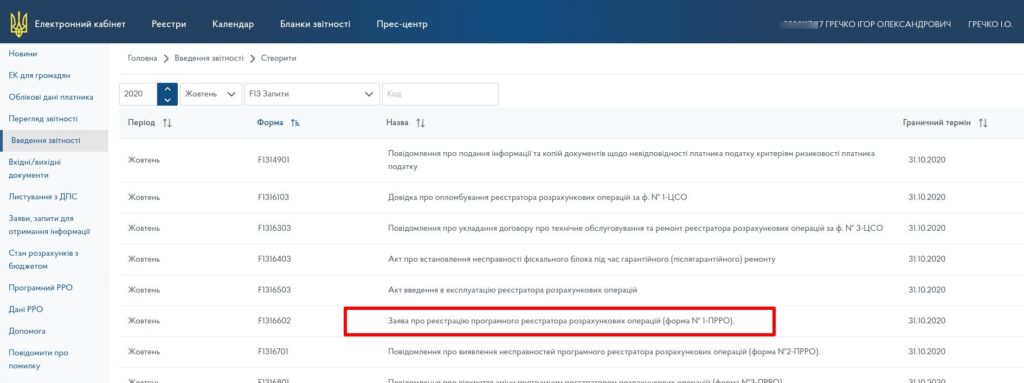
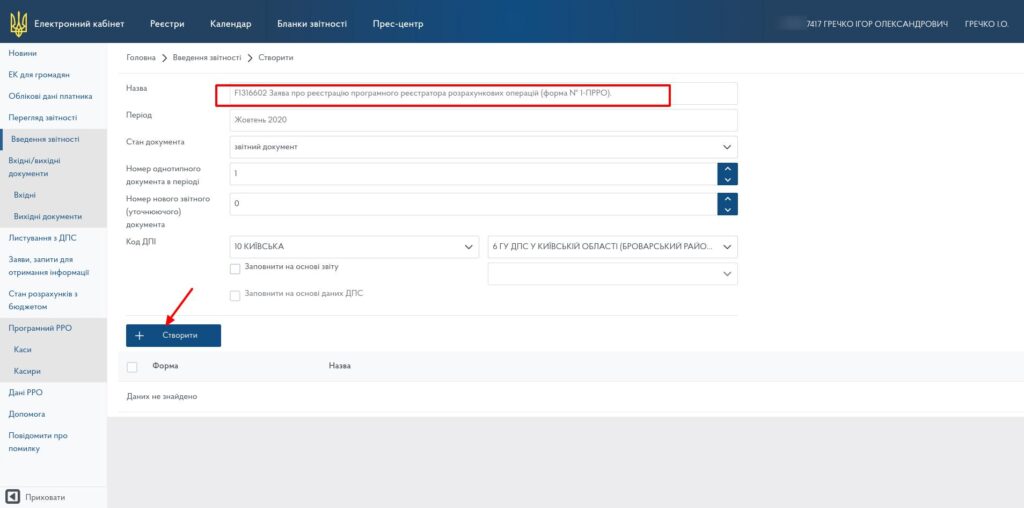
We fill out the form, indicating the name of the future cash desk and its local number in the fields for the name and number of the PKTS. We fill in all other fields according to the requirements for registration of the RRO, be sure to adhere to the exact name of the address and code according to the KOATUU for successful registration of the application.
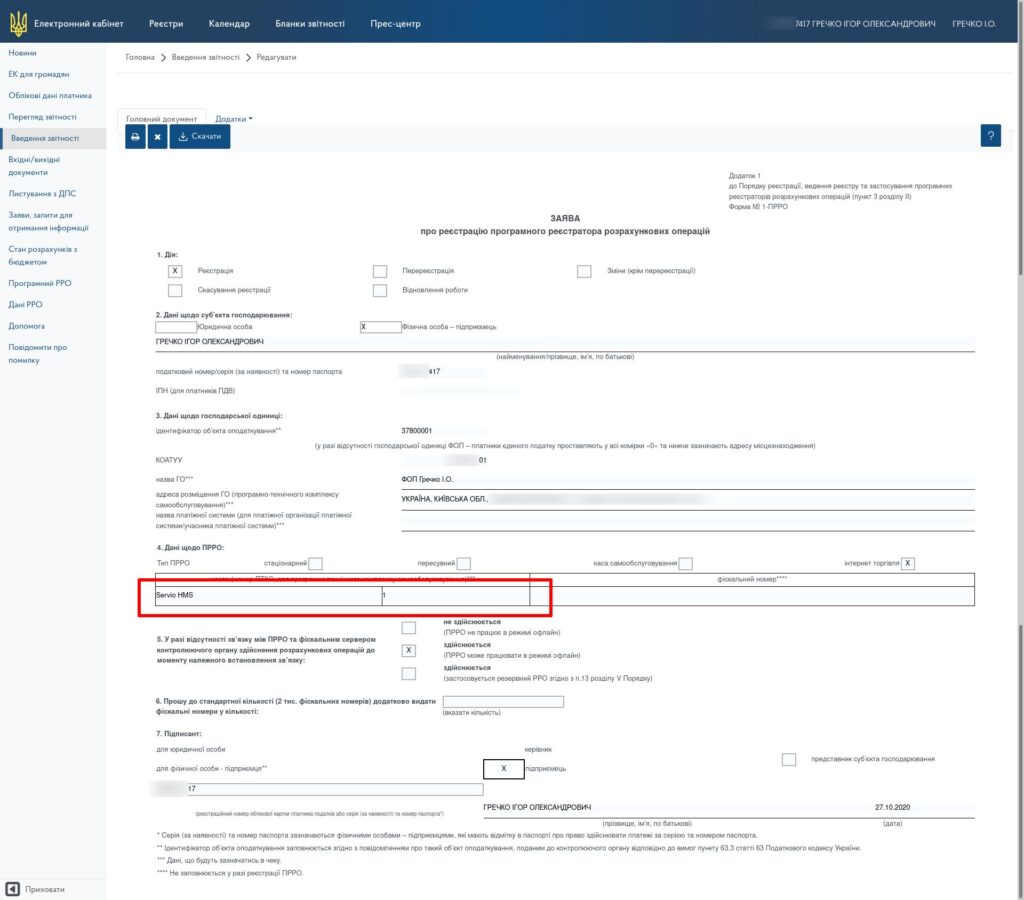
STEP 3. Register the app and connect to the SERVIO program.
Register the software RPO with the previously received details and data package for signing checks (certificate, key, password). This stage is also related to setting up cash registers in cash register systems and takes place with the participation of the SERVIO support service.
The specifics of obtaining certificates and keys depend on the authorization, and if you have any questions, please contact the appropriate organization.
To connect the software PPO, you must have HMS version 05.012.142 and higher installed, an updated POS. The update is carried out within the framework of a service agreement. The cost of connection, further terms of service, as well as applications for connection, please send to the commercial department: sales@servio.com.ua.
The support service performs the configuration of the program in the SERVIO program: help@servio.support.
How to connect a PRRO? Step-by-step instructions
To apply for a PRRO connection, write to us at help@servio.support
EXAMPLE:
In the subject of the letter: Connection of the PRRO (Dolce Vita Complex)
In the text: We are sending a request to connect the PRRO for the project
1) We will pay for the interface for working with the PRRO from:
Individual entrepreneur Ivanov Petro Leonidovich, code 1234567890
2) The number of required PRROs is 2 pcs.
– restaurant FOP Ivanov Petro Leonidovich
– hotel receptionist, FOP Ivanova Lyubov Vadymovna, code 234567890
Contact number for communication
+38 ___ – __ – __
Peter
In response, you will receive an invoice and information on further actions.
Integration of Software RRO with Business Processes
A cash register operator is a useful part of a unified digital business ecosystem. That is why the software RRO in SERVIO is designed with a focus on deep integration with the company's internal processes: from the cash register to accounting and management analytics. This approach minimizes manual work and provides data for decisions in real time.
The key advantage is that software RRO does not exist «on its own», but works in conjunction with accounting and management systems:
- Integration with accounting systems. Software RRO interacts correctly with SERVIO POS, 1C, and BAS. Sales, returns, discounts, and payments are automatically synchronized without data duplication.
- Automatic data transfer to the state tax service. After a transaction, information immediately enters the accounting system. This significantly simplifies fiscalization and reduces the risk of errors due to the «human factor».
- Analytics and management reporting. Data from the cash register generates detailed and clear reports, giving the manager a comprehensive overview of the business.
Thanks to this architecture, working with software RRO becomes a logical part of daily operations rather than a separate obligation. Installing RRO provides the business with control, speed, and transparency without the need to maintain a physical fiscal registrar for each cash register. This is exactly the case when technology does not complicate processes but makes them simpler and more predictable.
Автор статті: Анна Петрушко finmanager